- What Is WordPress SEO?
- Why WordPress SEO Looks Different in 2027
- The Search Visibility Model
- Start With Crawlability
- Crawling Is Not the Same as Indexing
- Check Your WordPress Indexing Settings
- Use Google Search Console as a Diagnostic Tool
- Don’t Obsess Over Average Position
- Find High-Impression, Low-CTR Opportunities
- Build Your Site Around Search Intent
- Choose Topics Before Keywords
- Create a Clear Content Architecture
- Internal Linking: Connect the Ideas
- Avoid Orphan Pages
- Write Titles That Explain the Value
- Meta Descriptions Are About the Click
- Create Content That Answers the Question Quickly
- Structure Content for Humans and Machines
- Build Topic Depth Instead of Publishing Randomly
- Update Existing Content Before Creating More
- Watch for Keyword Cannibalization
- Use Structured Data Carefully
- Don’t Build Your SEO Strategy Around Deprecated Search Features
- Don’t Ignore Images
- Image SEO Is Becoming More Interesting
- WordPress Performance Is Part of the SEO Conversation
- Understand Core Web Vitals
- Don’t Install Five Optimization Plugins to Fix One Problem
- Plugins Are Part of Your SEO Environment
- Technical SEO Is More Than Errors
- Prioritize SEO Problems by Impact
- Think in Terms of Business Impact
- Local WordPress SEO
- WooCommerce SEO Requires a Different Mindset
- Product Pages Need More Than a Product Name
- Category Pages Can Become Discovery Hubs
- Search Visibility and AI Discovery
- What Does AI Search Need From a Website?
- Entity Clarity Matters
- Don’t Chase Every AI SEO Trend
- Build Content for Questions, Not Just Keywords
- Use FAQs Strategically
- Build a Content Refresh System
- Measure SEO Beyond Traffic
- Use Search Console Data to Find Content Opportunities
- Monitor Pages, Not Just the Domain
- Technical SEO Audit Checklist
- A Better WordPress SEO Workflow
- What Should You Automate?
- Where VuloPilot Fits
- From One-Time SEO Audit to Continuous Visibility
- The Role of AI in WordPress SEO
- Human Judgment Still Matters
- Common WordPress SEO Mistakes
- What Not to Do With AI-Generated Content
- Build a Search-First Content Brief
- The SEO Prioritization Matrix
- A Practical 30-Day WordPress SEO Plan
- Your Monthly WordPress SEO Routine
- The Future of WordPress SEO Isn’t “More SEO”
- The Complete WordPress SEO Framework
- The Most Important SEO Question
- Final Word: SEO Is the Bridge Between Creation and Discovery
- Where VuloPilot Helps
You create the value. SEO helps people find it.
- You write the guide.
- Build the product.
- Launch the service.
- Open the store.
But creating something valuable is only half the journey.
The other half is discovery.
And in 2027, discovery happens across more than a traditional list of search results.
Your website needs to be discoverable, understandable, useful, technically accessible, and easy for both people and search systems to interpret.
That makes WordPress SEO much bigger than adding keywords to a page.
It is about building a website that can be found, understood, connected, trusted, and continuously improved.
This guide shows you how to do that, from crawling and indexing to content, internal linking, structured data, performance, WooCommerce, AI search, and ongoing SEO monitoring.
What Is WordPress SEO?
WordPress SEO is the process of improving a WordPress website so search engines can discover its pages, understand their content and purpose, connect them with relevant searches, and present them appropriately to people looking for that information.
That definition sounds simple.
The work isn’t.
A modern WordPress website is made up of dozens, hundreds, or sometimes thousands of interconnected elements:
Pages Posts Categories Products Product categories Images Authors Tags Internal links Navigation Structured data XML sitemaps Redirects Canonical URLs Plugins Themes JavaScript CSS Databases Media files External links Analytics Search Console data
Every one of these can influence how easily a website can be discovered, understood, or used.
That’s why modern SEO cannot be reduced to:
Pick a keyword write a page add the keyword publish.
The real process is closer to:
Understand Structure Create Optimize Publish Measure Improve
And that process never really ends.
- Your website changes.
- Your content changes.
- Your products change.
- Your customers change.
- Search changes.
- Your competitors change.
So your SEO system has to change with them.
Why WordPress SEO Looks Different in 2027
For years, SEO conversations were dominated by a familiar set of questions:
- What keyword should I target?
- How many times should I use it?
- How many backlinks do I need?
- What should my meta description say?
- How can I rank number one?
Those questions haven’t disappeared.
But they no longer describe the entire search environment.
Search has become increasingly diverse.
People search through:
- Traditional web search
- Image search
- Video
- Local search
- Product search
- Conversational queries
- AI-assisted search
- Multimodal search
- Voice interfaces
- Search-generated summaries
- Discovery experiences
Google’s current documentation now treats AI features as part of its search appearance landscape, and Search Console provides reporting for generative AI search visibility.
Google also introduced reporting for multimodal search experiences such as Lens, Circle to Search, image uploads, and visual search in September 2026.
That doesn’t mean you need a completely separate “AI SEO strategy.”
It means the fundamentals matter more.
- Clear content.
- Strong structure.
- Accessible pages.
- Useful information.
- Consistent entities.
- Good technical foundations.
- Relevant internal links.
- Descriptive metadata.
- Structured information.
- Strong user experience.
- And a website that search systems can actually understand.
The technology around search may keep changing.
Those fundamentals remain useful.
The Search Visibility Model
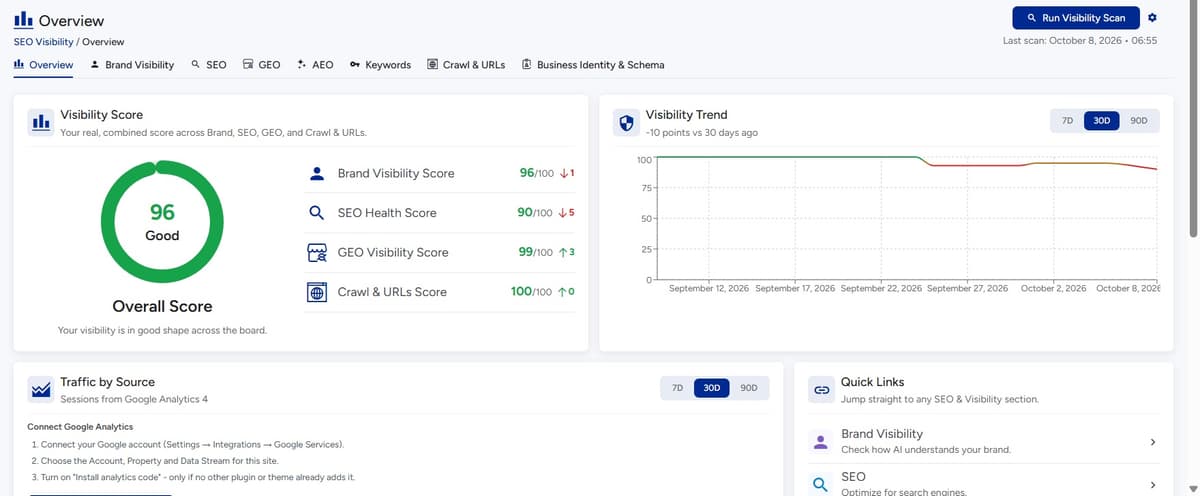
A useful way to think about WordPress SEO is as a chain.
- Discovery: Can search systems find the page?
- Access: Can they crawl and process it?
- Understanding: Can they determine what the page is about?
- Relevance: Does the content satisfy a real search need?
- Context: Can they understand how the page relates to your website, topic, business, products, or services?
- Presentation: Can the result communicate enough value for someone to choose it?
- Experience: Does the website deliver a useful experience after the click?
- Continuity: Are you monitoring and improving the system as the website changes?
This is why an SEO problem isn’t always a “ranking problem.”
- Sometimes it is a discovery problem.
- Sometimes it’s an indexing problem.
- Sometimes it’s a content problem.
- Sometimes it’s a site architecture problem.
- Sometimes it’s a user experience problem.
And sometimes the page is performing reasonably well, but you’re measuring the wrong thing.
The first skill in SEO isn’t optimization.
It’s diagnosis.
Start With Crawlability
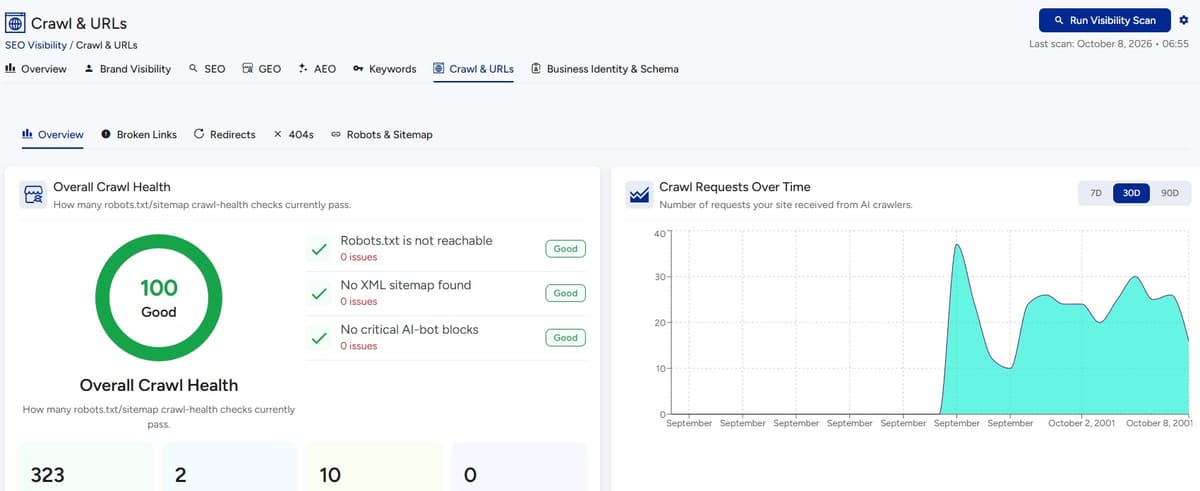
Before asking:
“Why isn’t this page ranking?”
Ask:
“Can search engines properly access this page?”
Crawling is the process through which search engines discover and access web pages.
For a WordPress website, crawling can be affected by:
- Robots.txt rules
- Internal links
- Redirects
- Server errors
- Noindex directives
- Login restrictions
- Poor site architecture
- Broken navigation
- Canonicalization
- URL parameters
- Duplicate URLs
- JavaScript-dependent content
- XML sitemap configuration
A page doesn’t become discoverable simply because it exists in WordPress.
It needs to be connected to the rest of the website.
Think about your important pages
Make a list of your most commercially or strategically important pages.
For a local business:
- Homepage
- Core service pages
- Location pages
- Contact page
For a SaaS company:
- Homepage
- Product pages
- Feature pages
- Use-case pages
- Comparison pages
- Key educational content
For WooCommerce:
- Homepage
- Main categories
- Important subcategories
- High-value products
- Buying guides
Ask yourself
Then ask:
Can a crawler discover these pages naturally through the site’s architecture?
If the answer is unclear, that’s your first SEO problem.
Crawling Is Not the Same as Indexing
This distinction is critical.
A search engine may crawl a page without choosing to index it.
Crawling
The page is accessed and processed.
Indexing
The page is stored in the search engine’s index and may become eligible to appear in search.
Ranking
The page is selected and positioned for a particular search.
These are three different stages.
Consider a product page.
The URL exists.
Google can access it.
But perhaps the product is almost identical to ten other products, has little unique information, and provides limited additional value.
The problem isn’t necessarily crawling.
It may be content quality, duplication, canonicalization, or page usefulness.
Now consider a service page with a noindex directive.
That’s a very different problem.
No amount of rewriting the copy will solve the immediate issue.
You need to remove the indexing barrier first.
This is why SEO audits should identify the type of problem, not simply produce a long list of warnings.
Check Your WordPress Indexing Settings
WordPress provides settings that can affect how search engines access the website.
One important area is the setting that discourages search engines from indexing the site.
This can be useful during development.
It can also become a problem if a production website is accidentally left with the wrong configuration.
Always verify your live site’s indexing configuration.
Then check individual pages.
Look for:
noindex- Canonical URLs
- Robots directives
- Redirects
- Status codes
- Duplicate URLs
Your SEO plugin may expose many of these settings, but don’t assume that a green plugin indicator means everything is correct.
Use actual search-engine diagnostics as well.
Use Google Search Console as a Diagnostic Tool
Google Search Console should not be treated as a trophy you install once and forget.
It is one of your most useful sources of evidence about how Google sees your website.
The Performance report provides data such as:
Clicks Impressions CTR Average position Queries Pages Countries Devices Search appearance
Google specifically recommends using these reports to understand which queries show your site, which pages receive visibility, and where click-through opportunities exist.
That’s valuable because your assumptions about what people search for are often incomplete.
- Your customers may use different language.
- Your content may appear for unexpected queries.
- A page you thought was unimportant may generate significant impressions.
- A page you consider your flagship resource may generate almost none.
Search Console shows you what is actually happening.
Don’t Obsess Over Average Position
Average position can be useful.
It can also be misleading if you treat it as the only SEO metric that matters.
Suppose your page receives:
- 20,000 impressions
- 500 clicks
- 2.5% CTR
That tells a different story from:
- 100 impressions
- 20 clicks
- 20% CTR
The second page has a higher CTR.
The first page has significantly greater search exposure.
And position itself is not always a perfect representation of what an individual user sees. Search results can vary by query, device, location, and other factors. Google notes that Search Console performance data should be interpreted using its dimensions and aggregation carefully.
Look at the complete picture:
Impressions CTR Clicks Landing-page behavior Business outcome
Find High-Impression, Low-CTR Opportunities
This is one of the simplest SEO opportunities to investigate.
Suppose a page gets:
30,000 impressions
but only:
400 clicks
The page is being seen.
The problem may be presentation, intent mismatch, competition, or the nature of the search result.
Search Console specifically recommends looking for high-impression, low-CTR pages as opportunities to improve titles, descriptions, or content alignment.
Don’t automatically rewrite every low-CTR page.
Instead, inspect:
- What queries generate impressions?
- What does the current title promise?
- What does the page actually deliver?
- What competitors appear?
- Is the intent informational, commercial, navigational, or transactional?
- Is your result compelling?
- Is the page targeting too broad a topic?
This is where SEO becomes analysis rather than box-ticking.
Build Your Site Around Search Intent
A keyword is not an audience.
A keyword is a clue.
Consider the phrase:
“WordPress SEO”
Someone could be looking for:
A beginner guide An SEO plugin An agency Technical help A checklist A tutorial A comparison A definition
Now compare that with:
“how to fix WordPress pages not indexed by Google”
The second search has a much clearer problem behind it.
The page should therefore behave differently.
- It should diagnose.
- Explain.
- Show checks.
- Provide fixes.
- Give examples.
The search intent determines the content experience.
Search Intent Framework
| Intent | User wants | Best content type |
|---|---|---|
| Informational | Learn something | Guide |
| Navigational | Find something | Brand/product page |
| Commercial | Evaluate options | Comparison |
| Transactional | Take action | Product/service page |
| Troubleshooting | Fix something | Diagnostic guide |
| Local | Find a nearby option | Local landing page |
| Research | Make a decision | Detailed resource |
Your goal isn’t to create a page for every imaginable keyword.
Your goal is to create the right page for the right need.
Choose Topics Before Keywords
A mature SEO strategy starts with topics.
Suppose you’re an ecommerce company selling running shoes.
You could target:
- Running shoes
- Best running shoes
- Running shoes for beginners
- Trail running shoes
- Road running shoes
- Running shoes for wide feet
- How to choose running shoes
- Running shoe sizing
Instead of treating these as unrelated keywords, think of them as a topic ecosystem.
You could create:
Main topic: Running Shoes
Supporting topics:
- Running shoe types
- How to choose running shoes
- Running shoe sizing
- Trail running shoes
- Road running shoes
- Running shoes for beginners
- Running shoes for wide feet
Now your site starts building topical depth.
Create a Clear Content Architecture
Your website should make it easy to answer:
“What does this site know about?”
Imagine someone lands on your website for the first time.
Can they quickly understand:
- What you do?
- Who you serve?
- What topics you cover?
- Which resources are most important?
- What your products or services are?
- Why your information is credible?
Search systems have a similar problem.
They need context.
A single article can explain one subject.
Your entire website communicates the bigger picture.
That’s why website-level architecture matters.
Internal Linking: Connect the Ideas
Internal links are not just navigation.
They create relationships between pages.
Imagine you publish a pillar article called:
WordPress SEO Guide
That article links to:
- Technical SEO guide
- Internal linking guide
- Schema guide
- Core Web Vitals guide
- Search Console guide
- WordPress security guide
- Content optimization guide
Those pages can then link back to the main guide where relevant.
You now have a content system rather than a collection of isolated articles.
Ask yourself
A practical internal linking rule
Before adding a link, ask:
“What would the reader logically need next?”
If the answer is another page on your site, link it.
That creates useful context for both people and search engines.
Avoid Orphan Pages
An orphan page is a page with little or no meaningful internal connection to the rest of your website.
For example:
- You publish a detailed guide.
- It gets indexed.
- But no other relevant page links to it.
The page exists, but it isn’t part of your site’s information architecture.
This can happen frequently on older WordPress websites.
- Content gets published.
- The writer moves on.
- Navigation changes.
- Old posts remain buried.
Years later, you have hundreds of pages that aren’t connected properly.
Ask yourself
A content audit should therefore ask:
Which important pages have weak internal connections?
Write Titles That Explain the Value
A title has a simple job:
Tell the reader why this result deserves attention.
- Weak: WordPress SEO Tips
- Better: WordPress SEO: The Complete Guide to Search Visibility
- Problem-led: Why Your WordPress Pages Aren’t Getting Found, And What to Fix
- Specific: How to Fix WordPress Indexing Problems
The best title depends on the intent.
Don’t force every title to contain the exact keyword in the exact same position.
Write for the searcher first.
Meta Descriptions Are About the Click
Meta descriptions aren’t a magic ranking lever.
Their practical value is communication.
You are telling someone:
“Here’s what you’ll get if you click.”
A useful description should:
- Reflect the page
- Explain the benefit
- Match the intent
- Avoid unnecessary repetition
- Give the reader a reason to continue
For example:
Learn how to improve WordPress SEO from technical foundations and indexing to internal linking, content strategy, performance, and AI search visibility.
That’s clearer than stuffing a list of keywords into the description.
Create Content That Answers the Question Quickly
One of the biggest problems with long-form SEO content is that writers are afraid to answer the question.
They spend 600 words “setting the scene.”
Don’t.
If someone searches:
“What is technical SEO?”
Answer it near the beginning.
Then expand.
For example:
Technical SEO is the process of improving the technical foundations of a website so search engines can crawl, interpret, index, and access its content effectively.
Then explain:
- Crawlability
- Indexing
- Site architecture
- Canonicals
- Redirects
- Structured data
- Performance
- Mobile usability
This is better for readers.
It also makes individual sections easier to understand and extract.
Structure Content for Humans and Machines
A well-structured article is easier to read.
It’s also easier to interpret.
Use:
- Clear H2 headings
- Useful H3 sections
- Short paragraphs
- Lists
- Tables
- Definitions
- Examples
- Step-by-step instructions
- FAQs
Don’t create artificial “AI-friendly” writing.
Clear writing is already useful to machines.
A strong section should be able to stand on its own.
For example:
What Is a Canonical URL?
A canonical URL tells search engines which URL should be treated as the preferred version when multiple URLs represent the same or substantially similar content.
Then explain when and why it matters.
That’s much better than hiding the definition halfway through a paragraph.
Build Topic Depth Instead of Publishing Randomly
Publishing 50 unrelated blog posts doesn’t necessarily create a strong SEO strategy.
Imagine a website with:
- 10 posts about WordPress
- 8 posts about email marketing
- 7 posts about social media
- 6 posts about AI
- 5 posts about web design
There may be a lot of content.
But what is the site actually known for?
Now imagine a website with:
WordPress SEO
- Technical SEO
- Indexing
- Internal linking
- Schema
- Search Console
- Content optimization
- Performance
- AI search
- WooCommerce SEO
The second structure communicates much more clearly.
This doesn’t mean you should artificially create hundreds of articles.
It means your content should have a reason to exist.
Update Existing Content Before Creating More
One of the easiest SEO opportunities is often sitting inside your existing content library.
You may already have:
- Articles ranking on page two
- Pages receiving impressions but few clicks
- Old posts with outdated information
- Strong articles with weak internal links
- Pages targeting similar topics
- Content that could be consolidated
- Pages that need better examples
Before publishing another 20 articles, audit the 20 pages that already have potential.
Look for:
High impressions + low CTR
Improve the presentation.
Ranking around page one/page two
Improve relevance, depth, structure, and internal linking.
Old but valuable content
Refresh it.
Multiple pages covering the same intent
Evaluate whether consolidation makes sense.
Important pages with few internal links
Strengthen their connections.
This is often more productive than endlessly adding new content.
Watch for Keyword Cannibalization
Keyword cannibalization happens when multiple pages compete for substantially overlapping search intent.
Imagine a site has:
- What Is WordPress SEO?
- WordPress SEO Guide
- WordPress SEO Tips
- WordPress SEO Best Practices
- WordPress SEO Checklist
If all five pages target essentially the same audience and intent, you may have created unnecessary overlap.
The solution isn’t always deletion.
You may decide to:
- Consolidate
- Differentiate intent
- Redirect
- Strengthen one primary resource
- Reposition supporting pages
The goal is clarity.
You want your website to have a clear answer to:
“Which page should someone read for this topic?”
Use Structured Data Carefully
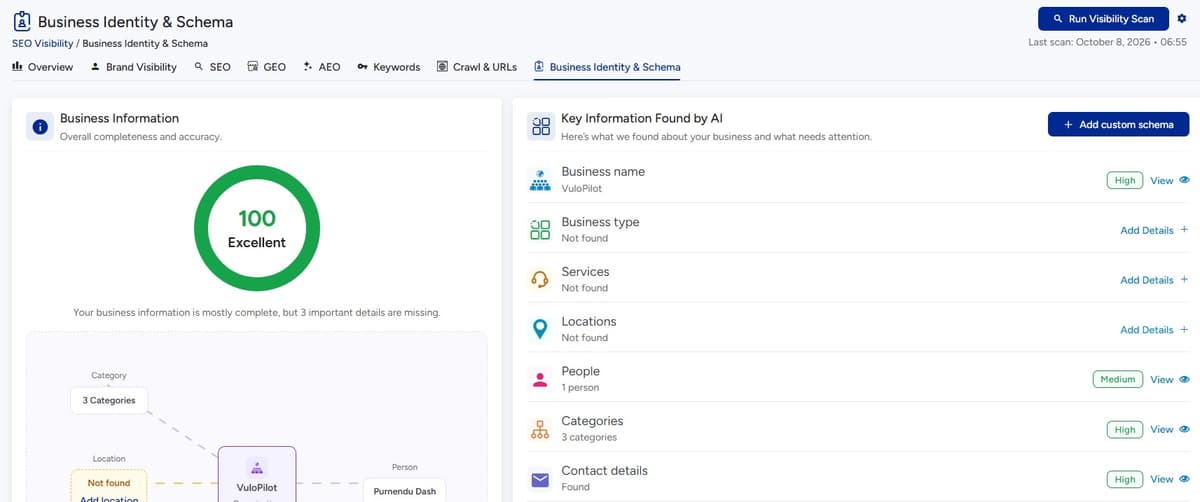
Structured data gives search engines additional information about the content on a page.
Google describes structured data as a way to help it understand page content and potentially make pages eligible for richer search features. Eligibility does not guarantee that a rich result will appear.
That distinction matters.
Structured data is not:
“Add schema and get rankings.”
It is:
“Describe your content in a standardized machine-readable format.”
Depending on the page, relevant structured data may include:
Organization LocalBusiness Product Article Breadcrumb Event Recipe Review SoftwareApplication
Only use structured data that accurately represents the page.
Don’t add markup simply because you want a richer result.
Accuracy comes first.
Don’t Build Your SEO Strategy Around Deprecated Search Features
Search features change.
That means an SEO strategy built around one specific SERP enhancement can age badly.
Google’s documentation changes regularly, and in 2026 it removed documentation for FAQ rich results after the feature stopped appearing in Google Search.
The lesson isn’t:
“Don’t use structured data.”
The lesson is:
Don’t confuse a particular search feature with SEO itself.
Build durable fundamentals:
- Useful content
- Clear structure
- Good internal linking
- Crawlability
- Indexability
- Accurate structured data
- Strong page experience
- Clear business information
Those survive changes in search presentation much better.
Don’t Ignore Images
Images are part of search visibility.
Your images should be:
- Relevant
- High quality
- Appropriately sized
- Descriptively named where useful
- Given meaningful alt text when appropriate
- Properly compressed
- Contextually related to the surrounding content
Alt text is primarily an accessibility mechanism.
Don’t turn it into keyword stuffing.
Instead of:
wordpress seo wordpress seo guide SEO tips
Write:
Screenshot of the WordPress Search Console performance report.
Describe what matters.
Image SEO Is Becoming More Interesting
As search becomes more multimodal, visual content becomes part of the discovery system.
Google announced multimodal search reporting in Search Console in September 2026, including searches using Lens, Circle to Search, image uploads, and image-based search interactions.
That makes visual content more than decoration.
- For ecommerce, images help communicate products.
- For local businesses, images communicate places and services.
- For publishers, diagrams can explain concepts.
- For tutorials, screenshots can demonstrate processes.
- For product pages, images help users understand what they’re considering.
Your images should therefore support the content rather than simply fill space.
WordPress Performance Is Part of the SEO Conversation
A slow website creates friction.
- Someone clicks.
- The page starts loading.
- Nothing happens.
- They leave.
- Or they wait.
- Or they return to the search results.
Performance therefore has a user-experience dimension as well as a technical one.
Important areas include:
- Hosting
- Caching
- Images
- JavaScript
- CSS
- Fonts
- Database queries
- Plugins
- Third-party scripts
- Server response time
- Mobile performance
Don’t optimize speed because a tool gave you a score.
Optimize speed because people shouldn’t have to wait for your website to become usable.
Understand Core Web Vitals
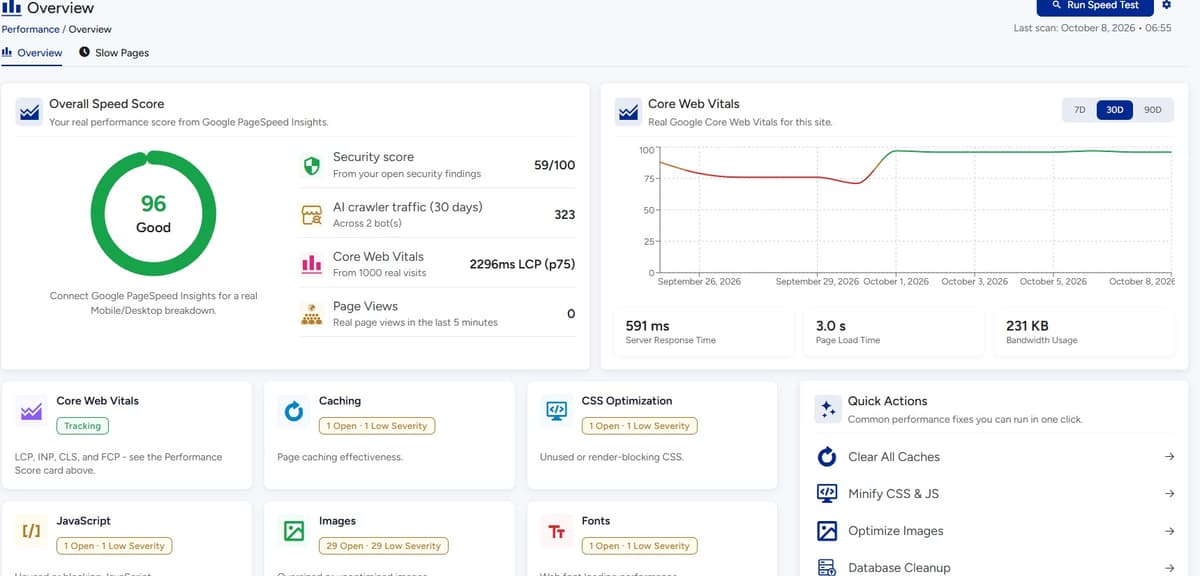
Core Web Vitals focus on important aspects of user experience.
They cover areas such as:
- Loading performance
- Responsiveness
- Visual stability
The important point is not to treat Core Web Vitals as a single SEO score.
A better approach is:
Measure identify the bottleneck fix the bottleneck measure again
For example:
A page has a huge hero image.
The solution isn’t:
“Make Core Web Vitals green.”
The solution is:
Compress and appropriately size the image, improve delivery, and verify the resulting loading experience.
That’s a much more useful way to work.
Don’t Install Five Optimization Plugins to Fix One Problem
This is a classic WordPress mistake.
A site becomes slow.
Someone installs:
- Cache plugin
- Image plugin
- Database plugin
- Script optimizer
- Another performance plugin
Now multiple systems are modifying the same resources.
The site becomes harder to troubleshoot.
Sometimes performance improves.
Sometimes it gets worse.
A better process is:
- Measure
- Identify the bottleneck
- Understand the cause
- Make one meaningful change
- Measure again
- Keep or revert based on evidence
Optimization without diagnosis is just experimentation.
Plugins Are Part of Your SEO Environment
WordPress plugins can improve your website.
They can also introduce:
- Additional scripts
- Duplicate metadata
- Conflicting schema
- Extra database queries
- Poorly configured redirects
- Duplicate functionality
- Compatibility issues
This doesn’t mean plugins are bad.
It means every plugin becomes part of the website system.
Ask yourself
Before installing another SEO tool, ask:
What problem am I solving?
Then ask:
Do I already have something solving it?
Simpler websites are often easier to understand, maintain, and troubleshoot.
Technical SEO Is More Than Errors
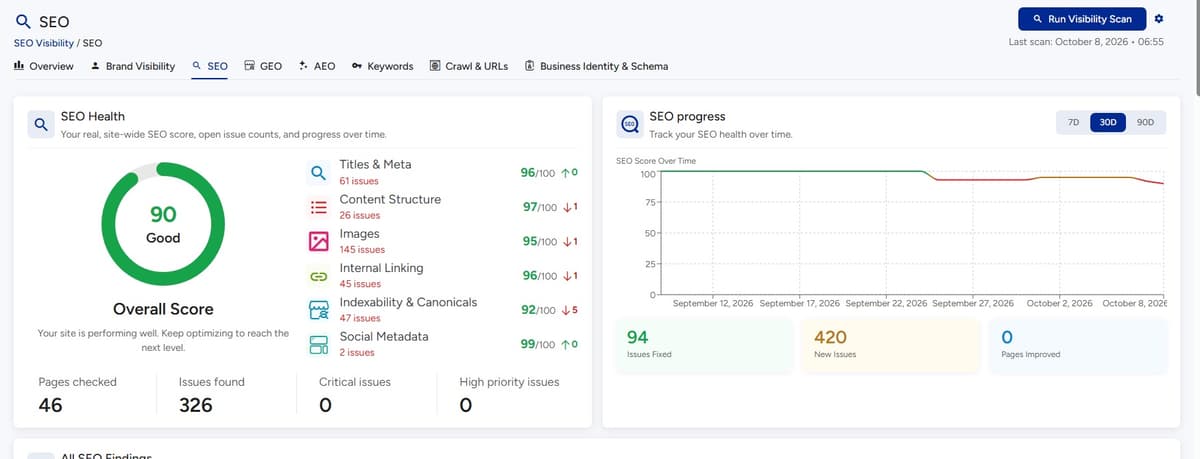
A common SEO report looks like this:
- 12 broken links
- 7 missing meta descriptions
- 5 oversized images
- 3 redirect chains
- 2 schema warnings
Useful?
Yes.
Complete?
No.
The bigger question is:
Which problem matters most?
One broken link on an old article may matter less than an incorrect canonical on your highest-value service page.
One missing meta description may matter less than 50 important pages competing for the same intent.
One oversized image may matter less than a slow checkout.
SEO needs prioritization.
Prioritize SEO Problems by Impact
A simple framework is:
Priority 1: Visibility blockers
Examples:
- Important pages blocked
- Incorrect noindex
- Major indexing problems
- Broken canonical setup
- Serious server errors
Fix these first.
Priority 2: High-value page problems
Examples:
- Poor service pages
- Weak product categories
- Important pages with low visibility
- High-impression/low-CTR pages
Priority 3: Site-wide improvements
Examples:
- Internal linking
- Metadata consistency
- Image optimization
- Schema
- Content structure
Priority 4: Refinements
Examples:
- Minor metadata improvements
- Small content edits
- Low-impact cleanup
This is much more useful than treating every warning equally.
Think in Terms of Business Impact
SEO shouldn’t end with:
“The page now ranks.”
Ask what happens next.
A technical change can create:
Technical improvementbetter accessbetter user experiencestronger discovery conditionsmore relevant traffic opportunitiespotential business value
For example:
Image optimizationsmaller page resourcesfaster loadingless frictionpotentially better engagementbetter conditions for conversion
No ranking guarantee is required.
The business logic is already useful.
Local WordPress SEO
Local businesses have a different search problem.
A customer isn’t necessarily looking for:
“Best company in the world.”
They’re looking for:
- “roofer near me”
- “landscaper in Birmingham”
- “dog groomer B33”
- “nail salon near Jewellery Quarter”
Local SEO therefore needs location context.
Your website should make it obvious:
- What you offer
- Where you offer it
- Who you serve
- How to contact you
- What areas you cover
- What makes the service relevant locally
Create useful location pages when they genuinely serve different audiences.
Don’t create hundreds of nearly identical pages by changing only the city name.
That creates pages for search engines rather than people.
WooCommerce SEO Requires a Different Mindset
A WooCommerce store may have hundreds or thousands of URLs.
SEO problems can therefore multiply quickly.
You need to think about:
- Product pages
- Category pages
- Subcategories
- Filters
- Search pages
- Variations
- Out-of-stock products
- Discontinued products
- Product schema
- Reviews
- Internal linking
- Navigation
- Pagination
- Duplicate URLs
The category page deserves particular attention.
A strong category page doesn’t simply list products.
It can communicate:
- What the category contains
- Who it is for
- How to choose
- Important attributes
- Related categories
- Useful buying information
This creates a better experience for both shoppers and discovery systems.
Product Pages Need More Than a Product Name
A product page shouldn’t rely entirely on manufacturer copy.
A useful product page can explain:
- What the product is
- Who it is for
- Main benefits
- Important specifications
- How it compares
- How to use it
- Frequently asked questions
- Shipping information
- Returns
- Availability
- Related products
The more important the product, the more carefully you should consider its information architecture.
Ask yourself
Your product page should answer:
“Why would someone choose this product?”
not simply:
“What is the product called?”
Category Pages Can Become Discovery Hubs
Imagine an ecommerce store selling coffee equipment.
A category page called:
Espresso Machines
could link to:
- Beginner espresso machines
- Commercial espresso machines
- Automatic machines
- Manual machines
- Espresso grinders
- Cleaning equipment
- Buying guide
Now the category page becomes a discovery hub.
This can help users navigate.
It can also strengthen the relationship between related content and commercial pages.
Search Visibility and AI Discovery
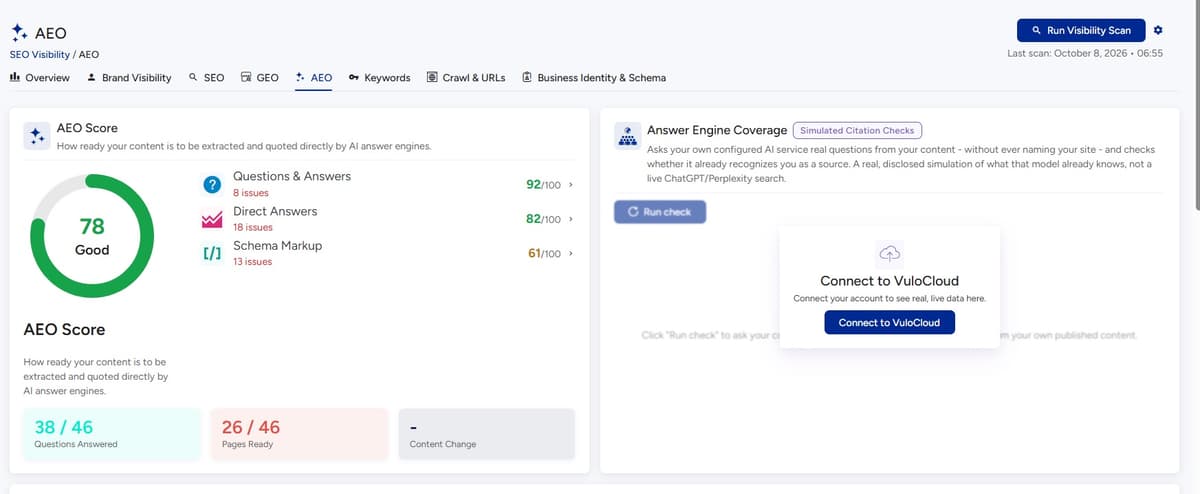
AI search introduces new questions.
- Will AI systems cite my website?
- Will my business appear in generated answers?
- Will my products be recommended?
Nobody can guarantee those outcomes.
And you shouldn’t build an SEO strategy around promises that no website owner can control.
What you can control is the quality and accessibility of the information you publish.
Make your content:
- Clear
- Specific
- Well structured
- Factual
- Consistent
- Easy to interpret
- Supported by relevant context
- Connected to the rest of your website
Think about the questions your audience actually asks.
Then answer them directly.
What Does AI Search Need From a Website?
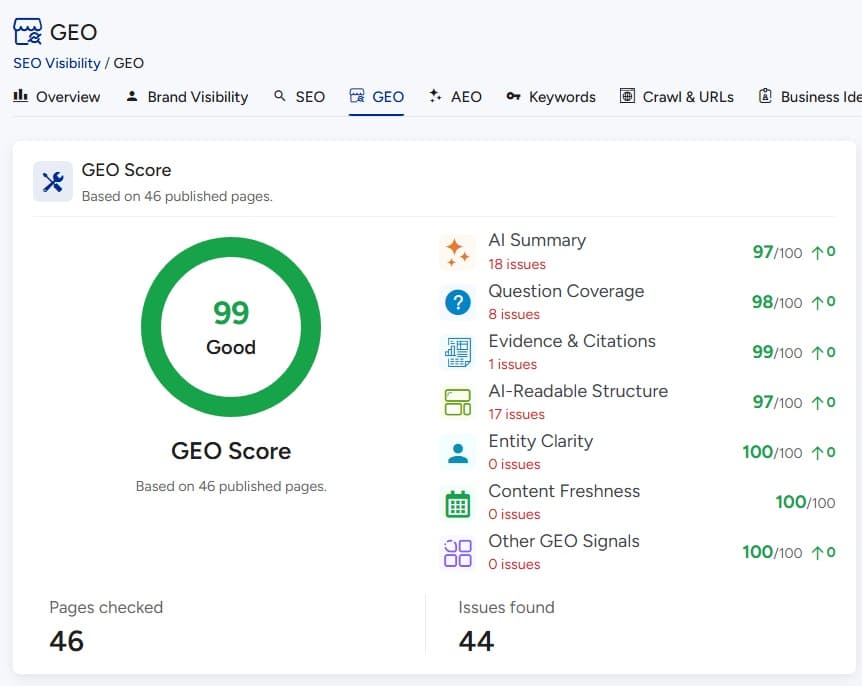
There isn’t a magic paragraph format that guarantees inclusion.
Instead, think about information clarity.
If your business offers web development, don’t make the homepage say:
“We transform digital possibilities into extraordinary experiences.”
That sounds polished.
It doesn’t communicate much.
Instead:
“We build WordPress websites for UK service businesses, including landscaping, roofing, home improvement, and local professional services.”
Now the business, audience, service, and context are much clearer.
Clarity helps humans.
It also gives information systems more useful context.
Entity Clarity Matters
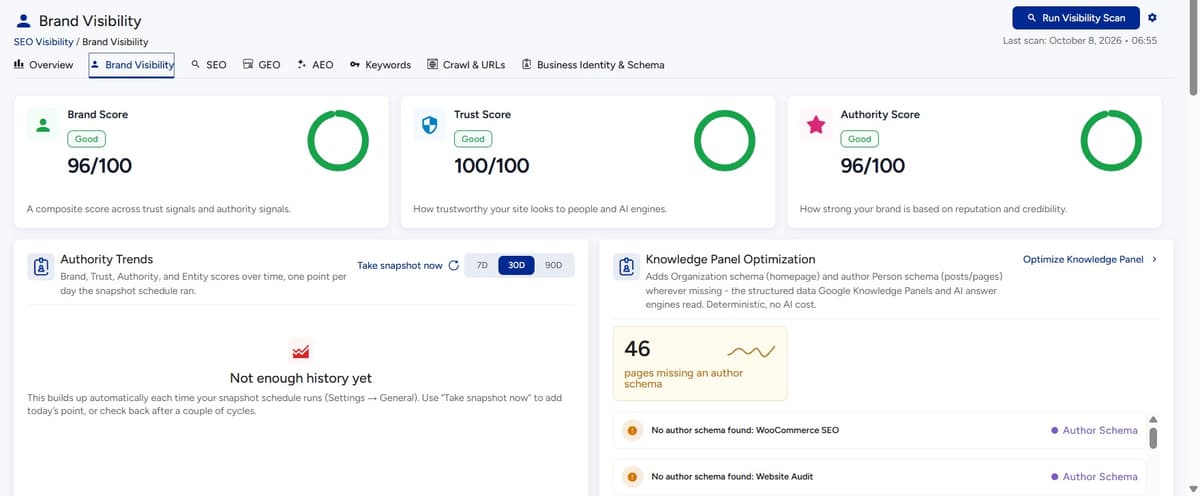
Search systems increasingly need to understand entities and relationships.
Your website should make clear:
- Who are you?
- What do you offer?
- Who do you serve?
- Where are you located?
- What products or services belong to you?
- What topics are you associated with?
- Who created the content?
For a company, this may involve:
- Organization information
- About page
- Author information
- Business details
- Product information
- Service information
- Consistent naming
- Relevant structured data
The goal isn’t to “hack entities.”
It’s to make the real-world identity of your business easier to understand.
Don’t Chase Every AI SEO Trend
This area changes quickly.
- One week there is a new AI optimization technique.
- The next week someone claims a new file format will transform SEO.
- Then another tool generates an “AI visibility score.”
Be careful.
Google clarified in June 2026 that llms.txt isn’t required for Google Search and does not positively or negatively affect Google Search visibility. It may still be used by other systems, but it should not become the foundation of your SEO strategy.
The lesson:
Don’t let a new acronym distract you from the fundamentals.
If your important pages aren’t indexed, fixing llms.txt isn’t your first priority.
If your content is unclear, adding another AI instruction file won’t solve the underlying problem.
Build Content for Questions, Not Just Keywords
Traditional SEO often starts with:
Keyword
Modern content strategy should often start with:
Question
For example:
Keyword:
WordPress speed
Questions:
- Why is my WordPress website slow?
- What makes WordPress slow?
- How do I find the slowest pages?
- Do plugins slow WordPress down?
- Does hosting affect WordPress speed?
- How do images affect page speed?
- How do I improve mobile performance?
Now you have a much richer content strategy.
One topic.
Multiple genuine questions.
Use FAQs Strategically
FAQs are useful when they answer real questions.
Good:
How long does WordPress SEO take?
SEO doesn’t have a universal timeline. Technical fixes can sometimes be identified quickly, while content visibility and authority typically require longer-term improvement and monitoring.
Bad:
A 30-question FAQ where every answer exists solely to insert another keyword.
FAQ sections should improve the usefulness of the page.
Not inflate it.
Build a Content Refresh System
Your content should have a lifecycle.
A simple model:
Create Publish Monitor Refresh Consolidate Retire
Step 01
Create
Publish genuinely useful content.
Step 02
Publish
Make sure technical and on-page elements are correct.
Step 03
Monitor
Look at impressions, clicks, queries, engagement, and conversions.
Step 04
Refresh
Update outdated information.
Step 05
Consolidate
Combine overlapping content when appropriate.
Step 06
Retire
Remove or redirect content that no longer serves a useful purpose.
This is more sustainable than endlessly publishing new articles.
Measure SEO Beyond Traffic
Organic traffic matters.
But traffic alone isn’t enough.
Track:
Visibility
- Impressions
- Queries
- Search appearances
- Pages receiving visibility
Engagement
- Clicks
- CTR
- Engagement
- Landing-page behavior
Business impact
- Leads
- Sales
- Signups
- Product purchases
- Contact enquiries
- Revenue where appropriate
Technical health
- Indexing
- Crawl issues
- Broken links
- Performance
- Security issues
The goal is to connect:
Search visibility website behavior business outcome
Use Search Console Data to Find Content Opportunities
Search Console can reveal searches you weren’t explicitly targeting.
Imagine an article about:
WordPress website optimization
starts receiving impressions for:
- WordPress performance
- WordPress SEO
- website speed
- WordPress optimization checklist
- WordPress technical SEO
Those queries tell you something.
They show how Google is interpreting the page.
They may reveal opportunities to:
- Expand the article
- Create supporting resources
- Improve internal links
- Create a dedicated page
- Clarify search intent
Your existing search data can therefore become your next content research tool.
Monitor Pages, Not Just the Domain
Website-level traffic can hide important problems.
Imagine:
Organic traffic is up 10%.
Sounds good.
But perhaps:
- Product traffic is down 20%
- Blog traffic is up 40%
- Service traffic is down 15%
The total number hides the important story.
Analyze by:
- Page
- Content type
- Topic
- Product category
- Service
- Location
- Device
- Country
- Search intent
Search Console supports grouping and filtering by dimensions such as pages, queries, countries, devices, and search appearance.
That makes segmentation much more useful than looking at one overall traffic number.
Technical SEO Audit Checklist
Use this as a starting point.
Crawlability
- Are important pages accessible?
- Is robots.txt configured correctly?
- Are important resources blocked?
- Are there broken internal links?
- Are redirects functioning?
Indexability
- Are important pages indexable?
- Are unintended pages indexed?
- Are noindex directives intentional?
- Are canonical URLs correct?
- Are duplicate pages handled?
Site architecture
- Is navigation logical?
- Are important pages easy to reach?
- Are there orphan pages?
- Are related topics connected?
Content
- Does each page have a clear purpose?
- Does it satisfy search intent?
- Is the information current?
- Is there unnecessary duplication?
- Does the page provide unique value?
On-page SEO
- Is the title descriptive?
- Is the main heading clear?
- Are headings logical?
- Are internal links useful?
- Are images appropriately described?
Structured data
- Is the markup accurate?
- Does it match visible content?
- Is the implementation valid?
Performance
- Are images optimized?
- Is caching configured appropriately?
- Are scripts necessary?
- Is mobile performance acceptable?
- Are server bottlenecks understood?
Measurement
- Is Search Console connected?
- Is analytics configured?
- Are important conversions tracked?
- Are SEO changes monitored?
A Better WordPress SEO Workflow
Instead of randomly fixing whatever your SEO plugin highlights, use a repeatable workflow.
Step 01
Audit
Find the problems.
Look at:
- Crawlability
- Indexing
- Content
- Internal links
- Performance
- Structured data
- Search performance
Step 02
Understand
Don’t fix the warning before understanding the cause.
Ask:
Why is this happening?
Step 03
Prioritize
Classify problems by:
- Business impact
- Search impact
- Number of pages affected
- Difficulty
- Urgency
Step 04
Improve
Make the change.
Step 05
Verify
Did the problem actually disappear?
Did the page improve?
Did anything else break?
Step 06
Monitor
Watch what happens over time.
Step 07
Automate
Automate repetitive monitoring where practical.
This turns SEO from a random activity into an operating system.
What Should You Automate?
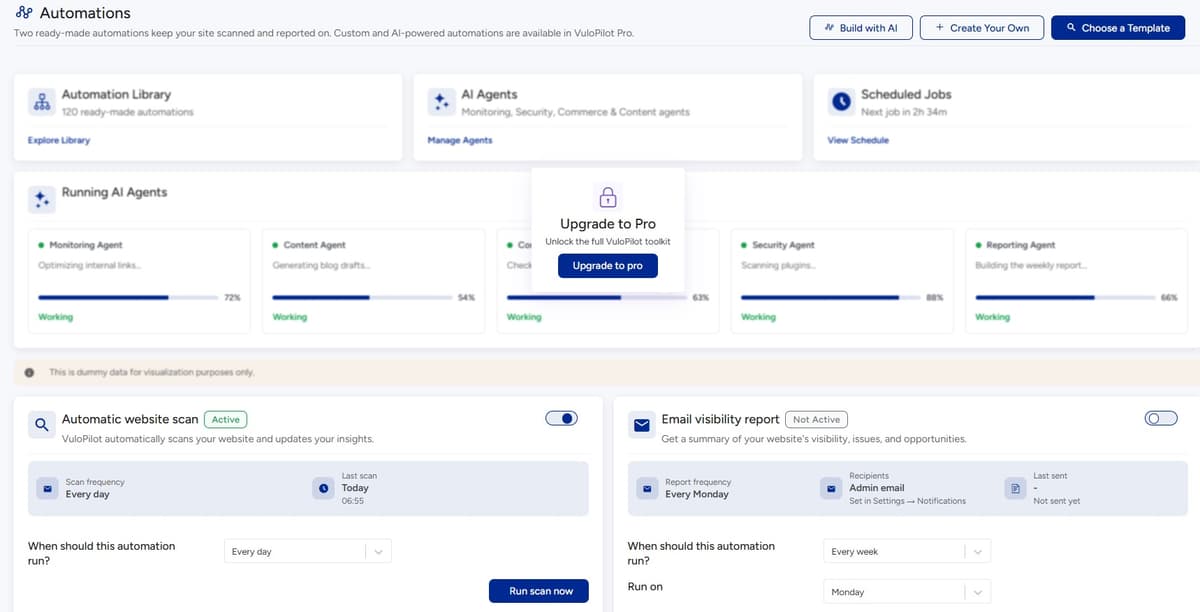
The better question isn’t:
“What can AI automate?”
It’s:
“What repetitive website work shouldn’t require me to remember to do it?”
Good candidates include:
- Recurring audits
- Broken-link checks
- Performance monitoring
- Search-performance reporting
- Technical alerts
- Content review reminders
- Website health monitoring
- Repetitive optimization suggestions
- Reporting
But automation should not remove judgment.
A system can tell you:
“This page has low CTR.”
A human still needs to ask:
“Why?”
A system can detect:
“This page has a large image.”
A human still needs to decide:
“Is that image important enough to keep at its current quality?”
AI can help interpret information.
It should not replace evidence.
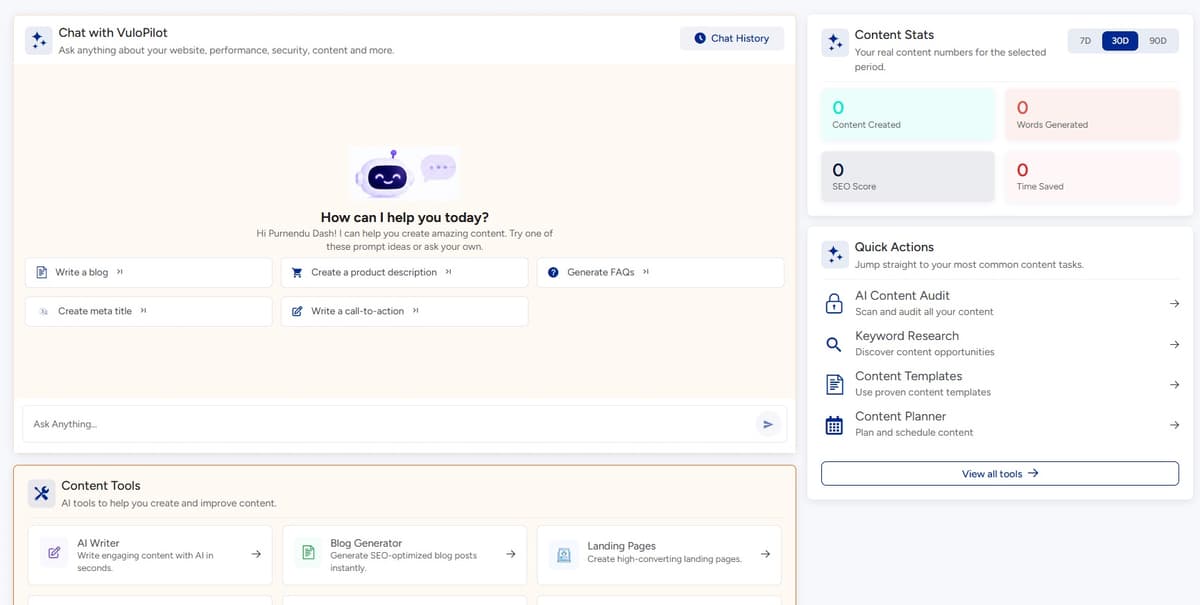
Where VuloPilot Fits
SEO becomes difficult when every improvement requires another tool, report, spreadsheet, browser tab, or manual check.
The challenge isn’t simply finding SEO problems.
It’s keeping track of the entire website.
That’s where an AI operating layer for WordPress can become useful.
VuloPilot’s broader positioning is not simply “another SEO plugin.”
The supplied product brief positions it as an AI Operating System for WordPress, connecting search visibility with performance, security, website health, content, commerce, and automation.
That distinction matters.
A website owner doesn’t necessarily want:
“Another SEO dashboard.”
They want to know:
- What is wrong?
- Why does it matter?
- What should I fix first?
- What can I improve automatically?
- What should I monitor afterward?
That’s the more useful workflow.
From One-Time SEO Audit to Continuous Visibility
A traditional audit often looks like this:
Run audit receive report fix issues forget about it
The problem?
The website changes tomorrow.
- A plugin updates.
- A page gets deleted.
- A redirect changes.
- A product becomes unavailable.
- A developer changes the theme.
- A new article creates duplicate intent.
- A performance issue appears.
- A page starts losing impressions.
The audit becomes outdated.
A continuous approach is different:
Audit Understand Prioritize Improve Monitor Automate Grow
That’s the operating model.
The objective isn’t to create a perfect website once.
It’s to create a process that notices when the website moves away from where you want it to be.
The Role of AI in WordPress SEO
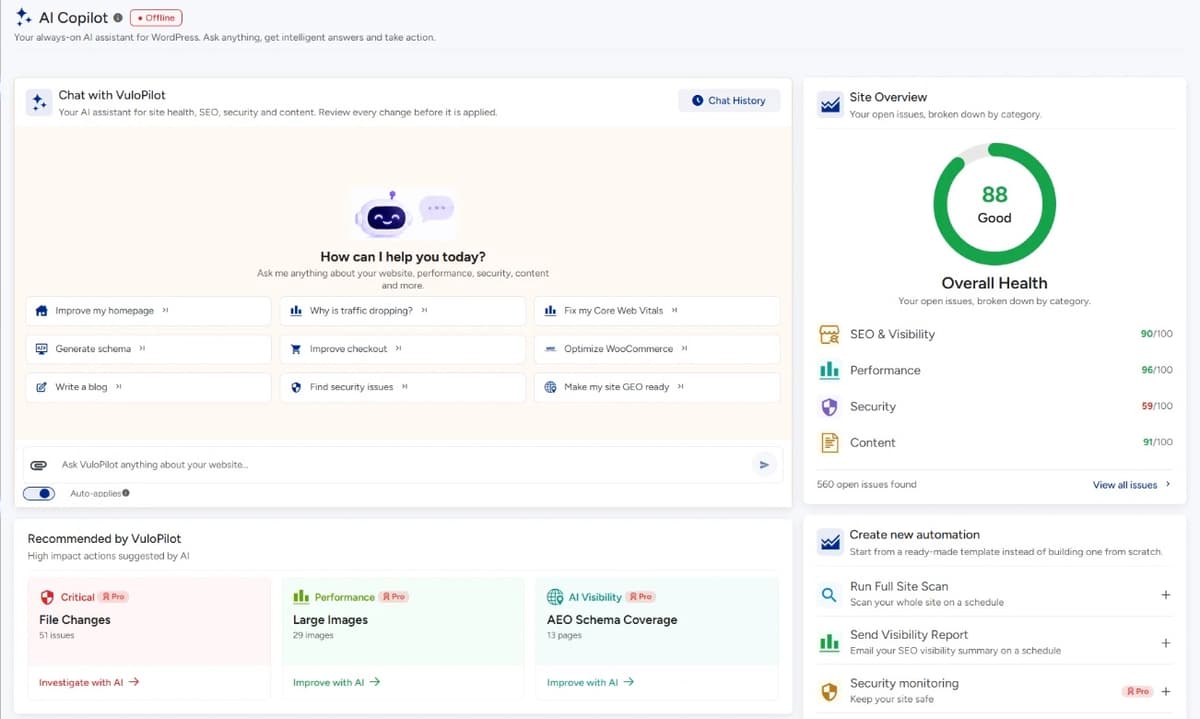
AI is useful in SEO.
But AI isn’t SEO.
That distinction is important.
AI can help with:
- Content analysis
- Topic research
- Recommendations
- Summarization
- Prioritization
- Content assistance
- Identifying patterns
- Explaining technical issues
- Repetitive workflows
But deterministic evidence remains essential.
For example:
- A performance metric should come from measurement.
- An HTTP status should come from the website.
- An indexing state should be verified.
- A broken link should actually be broken.
AI can help interpret these facts.
It shouldn’t invent them.
Human Judgment Still Matters
Imagine an AI tool recommends:
“Add 1,000 words to this page.”
That’s not necessarily good advice.
- Maybe the page is already too long.
- Maybe the search intent is simple.
- Maybe the real issue is poor structure.
- Maybe another page already covers the missing information.
- Maybe the page should be consolidated instead.
The better workflow is:
Evidence Interpretation Decision Action
Not:
AI suggestion Publish
This distinction will become increasingly important as more SEO workflows become automated.
Common WordPress SEO Mistakes
Mistake 1: Publishing more instead of improving existing pages
More content isn’t automatically more visibility.
Mistake 2: Treating green SEO scores as success
A plugin score is not a search-result position.
Mistake 3: Optimizing every page for a separate keyword
This can create unnecessary duplication.
Mistake 4: Ignoring internal links
Great pages can remain disconnected.
Mistake 5: Fixing low-impact warnings before major problems
Prioritization matters.
Mistake 6: Chasing every AI SEO trend
Fundamentals still matter.
Mistake 7: Using AI to generate content without editorial control
More words aren’t necessarily more value.
Mistake 8: Ignoring old content
Your existing content can contain some of your biggest opportunities.
Mistake 9: Installing too many plugins
More tools can mean more complexity.
Mistake 10: Measuring only rankings
Visibility, clicks, conversions, and technical health all matter.
What Not to Do With AI-Generated Content
AI can help you create content faster.
That doesn’t mean you should publish everything it produces.
The biggest problem isn’t necessarily that content was created with AI.
The bigger problem is content without a reason to exist.
Before publishing AI-assisted content, ask:
- Is this actually useful?
- Does it answer a real question?
- Does it add something original?
- Is it factually accurate?
- Is the information current?
- Does it reflect our actual expertise?
- Does it provide examples?
- Does it help someone make a decision?
If the answer is no, publishing faster doesn’t solve the problem.
It multiplies it.
Build a Search-First Content Brief
Before writing a page, answer:
Audience
Who is this for?
Problem
What problem are they trying to solve?
Intent
What do they actually want?
Primary answer
What should they understand within the first few paragraphs?
Supporting questions
What else will they need to know?
Evidence
What examples, data, screenshots, or experience can support the explanation?
Internal links
What should they read next?
Business goal
What should the visitor do after understanding the topic?
This makes content more useful before you even start writing.
The SEO Prioritization Matrix
When you have dozens of SEO issues, use four questions.
| Question | Low | High |
|---|---|---|
| Business impact | Nice to have | Directly affects important pages |
| Search impact | Minor | Visibility blocker |
| Scope | One page | Site-wide |
| Effort | Difficult | Easy |
A site-wide indexing problem with high business impact should generally take priority over a minor metadata warning.
A weak title on a page receiving 50,000 impressions may deserve more attention than a missing title on an old page receiving no visibility.
SEO isn’t about fixing the most warnings.
It’s about fixing the most important problems.
A Practical 30-Day WordPress SEO Plan
Step 01
Week 1: Find the problems
Audit:
- Indexing
- Crawlability
- Search Console
- Site structure
- Broken links
- Redirects
- Performance
- Important pages
Create one prioritized list.
Don’t fix everything yet.
Step 02
Week 2: Fix the foundation
Focus on:
- Indexing problems
- Important redirects
- Canonicals
- Crawlability
- Broken internal links
- Site architecture
The goal is to make sure search systems can properly access and understand the important parts of the site.
Step 03
Week 3: Improve important pages
Choose your highest-value pages.
Improve:
- Search intent alignment
- Titles
- Headings
- Content clarity
- Internal links
- Images
- Structured data
- Calls to action
Don’t optimize 100 pages badly.
Optimize the pages that matter most first.
Step 04
Week 4: Build the system
Set up:
- Search Console monitoring
- Performance monitoring
- Content refresh process
- Technical checks
- Reporting
- Recurring audits
Then establish a monthly review.
SEO should become part of website operations.
Your Monthly WordPress SEO Routine
Once the major work is done, don’t disappear for six months.
Every month, review:
Search visibility
- What queries are growing?
- What queries are declining?
- Which pages gained impressions?
- Which lost visibility?
Content
- What should be updated?
- What is outdated?
- What content overlaps?
Technical
- Any indexing problems?
- Broken links?
- Redirect issues?
- Performance changes?
Business
- Which organic pages generate leads?
- Which product pages generate sales?
- Which content attracts qualified visitors?
Opportunities
- What new queries are appearing?
- Which pages are close to page-one visibility?
- Which topics deserve deeper coverage?
That gives you a feedback loop.
The Future of WordPress SEO Isn’t “More SEO”
This is perhaps the biggest mindset shift.
A website doesn’t need endless optimization.
It needs better decisions.
Instead of:
“We need 20 more articles.”
Ask:
“Which customer questions aren’t we answering?”
Instead of:
“Our SEO score is 82.”
Ask:
“Which important pages still aren’t getting discovered?”
Instead of:
“We need more keywords.”
Ask:
“Which topics should our website be clearly associated with?”
Instead of:
“We need AI SEO.”
Ask:
“Is our information clear enough for modern search systems to understand?”
Instead of:
“We need another SEO tool.”
Ask:
“What part of our website operation are we currently managing manually?”
Those questions lead to better decisions.
The Complete WordPress SEO Framework
If you want one framework to remember, use this:
- Discover: Find how people search for your products, services, problems, and expertise.
- Structure: Build a logical website architecture.
- Access: Make sure search systems can crawl the pages that matter.
- Index: Check that important pages are eligible for indexing.
- Explain: Make your content and business purpose clear.
- Connect: Use internal links to establish relationships.
- Enhance: Use appropriate structured data and strong media.
- Improve: Optimize content, performance, and user experience.
- Measure: Use Search Console and analytics to understand what happens.
- Refresh: Keep important content current.
- Monitor: Watch for technical and search changes.
- Automate: Reduce repetitive website-management work.
That is modern WordPress SEO.
The Most Important SEO Question
If you remember only one question from this guide, make it this:
Ask yourself
“What is preventing the right people from discovering this page?”
Then investigate.
- Maybe they can’t crawl it.
- Maybe they can’t index it.
- Maybe they don’t understand it.
- Maybe the content doesn’t match their intent.
- Maybe another page is competing with it.
- Maybe the title doesn’t communicate the value.
- Maybe your internal architecture doesn’t support it.
- Maybe the page is too slow.
- Maybe the content is outdated.
- Maybe you’re targeting the wrong audience.
- Maybe the page is visible but the business isn’t measuring the right outcome.
The answer changes from website to website.
That’s why good SEO begins with diagnosis.
Final Word: SEO Is the Bridge Between Creation and Discovery
You don’t create a website because you enjoy filling dashboards with green checkmarks.
You create because you have something to offer.
- A product.
- A service.
- An idea.
- An answer.
- A business.
- A body of expertise.
- A solution to someone’s problem.
SEO is the bridge between that value and the people searching for it.
And in 2027, that bridge has become more sophisticated.
- Your website has to communicate with traditional search.
- It has to work for users on mobile devices.
- It has to make important pages accessible.
- It needs a structure that connects related information.
- It needs content that answers real questions.
- It needs useful internal links.
- It needs accurate structured information.
- It needs a good experience.
- It needs measurement.
And increasingly, it needs to be understandable within a search environment that includes AI-assisted and multimodal discovery.
But you don’t need to chase every new search trend.
Start with the fundamentals.
- Make the important pages discoverable.
- Make the content understandable.
- Make the website useful.
- Make the structure logical.
- Make the experience good.
- Measure what happens.
- Improve what matters.
And then keep doing it.
Because the strongest WordPress SEO strategy isn’t the one with the longest checklist.
It’s the one that keeps your website ready to be discovered.
Where VuloPilot Helps
The challenge with modern WordPress SEO isn’t only knowing what to optimize.
It’s keeping track of everything that changes afterward.
A website can have problems across search visibility, performance, content, security, website health, and ongoing maintenance at the same time.
VuloPilot is positioned around this broader problem: bringing these website-improvement disciplines into one operating layer rather than treating SEO, performance, security, and website health as completely separate jobs.
That means the useful workflow is not simply:
Run SEO scan get score
It’s:
Audit Understand Prioritize Improve Monitor Automate Grow
For a website owner, that can turn SEO from an occasional project into a continuous website-management process.
AI can assist with analysis, recommendations, interpretation, prioritization, and repetitive work, while measurable technical conditions should still be verified using actual website data. The VuloPilot editorial framework explicitly calls for AI to support decisions rather than replace technical evidence or human control.
The result is a more useful way to think about SEO:
Not another task on your list.
A system for keeping your website discoverable.
Key Takeaways
- SEO starts with discoverability, not keywords.
- Crawlability and indexability should be checked before worrying about rankings.
- Your website architecture helps search systems understand how your content relates.
- Internal linking should connect useful information, not simply add more links.
- Search intent should determine what each page is designed to accomplish.
- AI search makes clarity, structure, accessibility, and useful information increasingly important, but there are no guaranteed AI-search shortcuts.
- Search Console should be used as an ongoing source of evidence, not a once-a-year report.
- Prioritize SEO problems according to business and search impact rather than fixing every warning equally.
- Existing pages can often provide better SEO opportunities than endlessly publishing new ones.
- Modern WordPress SEO is continuous: audit, understand, prioritize, improve, monitor, automate, and grow.